
Requirements
- An iPhone or iPad that supports Apple Intelligence. On other devices the tools are hidden.
- Apple Intelligence turned on and set up in the iOS Settings app.
- SiniPrompt Pro. Without it, tapping the tools opens the Pro overview.
Opening the tools
Tap Script Tools (sparkles icon) in the script view, or the same icon in the editor's top bar. The script must not be empty.
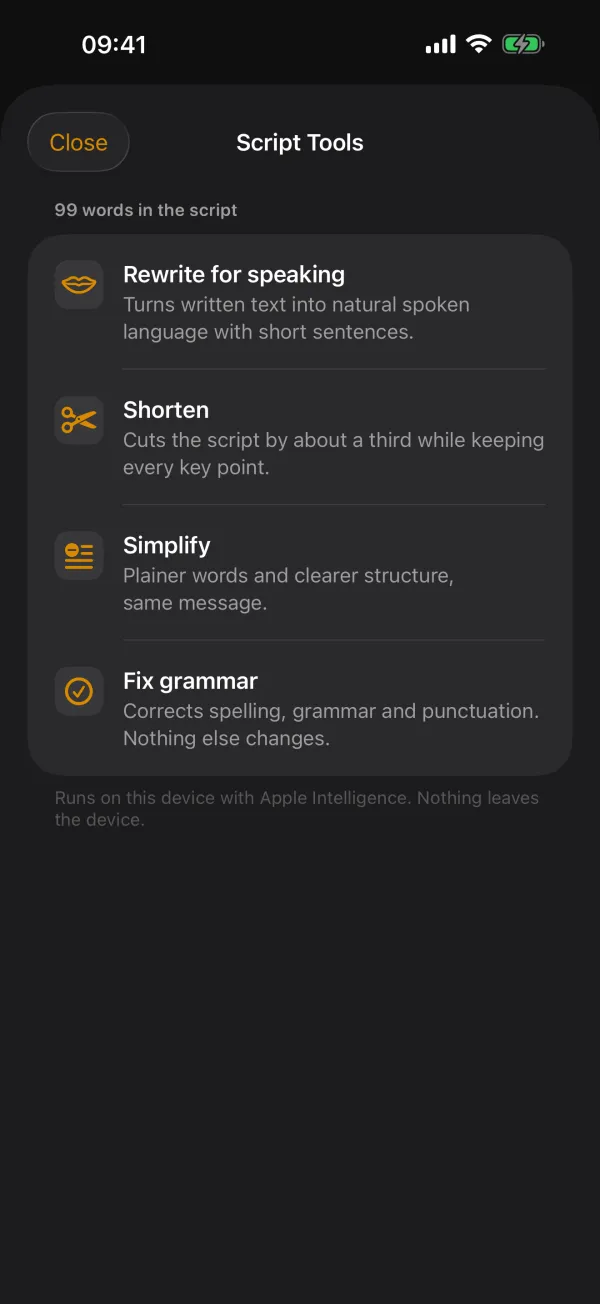
The four tools
- Rewrite for speaking
- Turns written text into natural spoken language with short sentences. Ideal for texts originally written to be read, such as blog posts.
- Shorten
- Cuts the script by about a third while keeping every key point. Useful when your video needs a fixed length.
- Simplify
- Plainer words and clearer structure, same message.
- Fix grammar
- Corrects spelling, grammar and punctuation. Nothing else changes.
Every tool keeps your script's language, facts, names, numbers and paragraphs and returns plain text.
How it works
- Pick a tool. The result appears as it is written ("Working…"). Long scripts are processed in sections, with a progress bar. Stop cancels.
- Read the result. You can select and copy text from it.
- Decide: Replace script takes the result, Append instead adds it below your script, Try another tool discards it.
Always check the result before you take it. A language model may change phrasing that matters to you. "Replace script" cannot be undone. When in doubt, use "Append instead" and delete the old part by hand.
Possible messages
- "Turn on Apple Intelligence in Settings…"
- Apple Intelligence is off. Turn it on in the iOS Settings app.
- "The on-device model is still being prepared…"
- iOS is still downloading the model. Try again in a few minutes, ideally on Wi-Fi and while charging.
- Paragraph too long
- A single paragraph is too long for the model. Split it with a blank line and try again.
- Language not supported
- Apple's model does not support your script's language yet.
- Declined
- The model declines some texts because of its safety rules. Apple's model decides this; SiniPrompt has no influence on it.
Frequently asked questions
Is my script sent to an AI service?
No. The script tools use Apple's on-device language model (Apple Intelligence). The text never leaves your iPhone or iPad.
Why can't I see the script tools?
They need a device that supports Apple Intelligence. On other devices SiniPrompt hides them; every other feature stays available.